
Auto trade
Pick the card and version, set a profit target. EasySnipeFut checks the price first, then searches for listings under your max price for 4 minutes. Each card it buys is listed at the price from that check.
EasySnipeFut opens the web app with a panel next to it. It finds a card’s real lowest price and buys listings under your max price within a second, and it plans your FUT Gallery: every set’s grade, what’s missing for S and the cheapest cards to get there.
Sample session
EasySnipeFut just launched with sniping and the FUT Gallery in one app. Start at the launch price before the month ends.
1–5 million
coins a month for active users
Based on our active users’ trades, after EA tax.
EA market
Snipe and auto trade prices come straight from the web app’s own market.
5% tax
Every buy, sell and profit figure has the EA tax taken off.
Exact floor
The card’s real lowest price, picked out of results sorted by time left.
On your computer
Everything runs on your computer; your EA session never reaches us.
Open the gallery from the panel and it reads which cards are already in your gallery straight from EA, even the ones you sold. Every set gets its grade, the best grade you can still reach, and the cheapest cards that take it there.
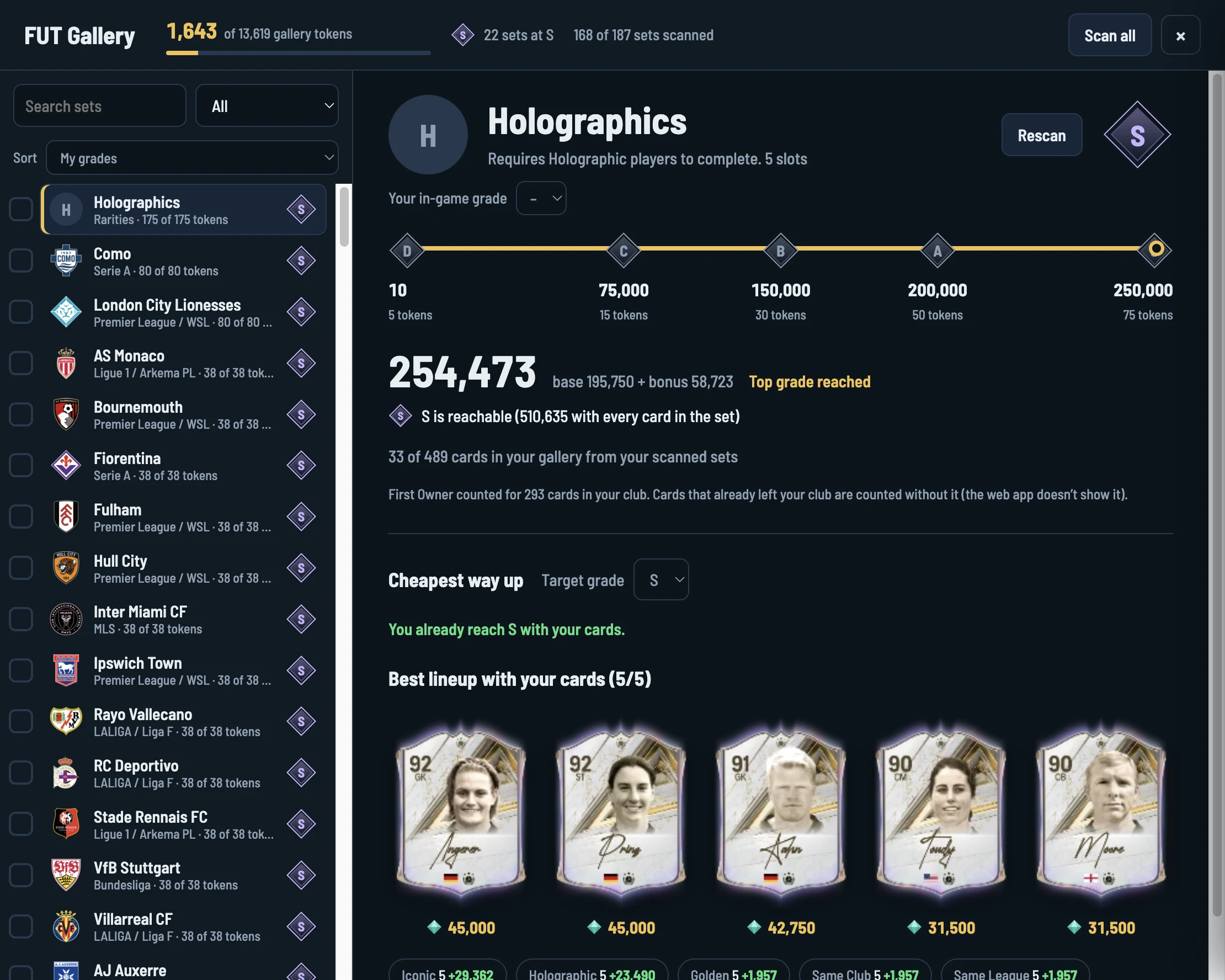
One button reads your gallery and club from EA. Every set takes about a minute.
Each set shows your grade, the best grade you can reach and the points you still need.
The cheapest cards to the next grade or S. Buy them, or buy and relist them to get most of the coins back.
Club → Gallery → pick the set → Autocomplete → Confirm changes. That’s where grades and tokens are given.
Pick filters on the web app’s Transfer Market search screen, the way you always do: position, nation, league, club, rarity, or a manager or chemistry style. Enter your max price there and start. Every listing that matches and is under your price can be bought, and you see exactly which card it was.
Ollie Watkins (84) bought for 6,800. Listed for 7,800. +610 profit
Dominic Solanke (81) at 1,400: someone else bought it first.
Danny Welbeck (79) bought for 900. Listed for 1,100. +145 profit
Sample data
When our team spots a card worth trading, it shows up in the panel’s Tips window: the card or web app filter, the most to pay, and a short note. One click loads it into the web app’s search screen. When it’s time to sell, the same tip gets a sell alert.
Bruno FernandesBuy
Max buy 98,000Now 101,500
Steady demand, lots of listings. Pick up anything under 98K.
Premier League · Gold Rare · STSell
Max buy 2,300Sell target 3,100
Sell alert: the SBC that needed these has ended. List them at the target.
Klara BühlBuy
Max buy 41,000Now 43,500
Cheap for her stats after the latest drop. Under 41K is a good buy.
Sample data
The panel lists the cards our users searched in the last hour in your market, with the share of searches that found a listing under the max price. Tap a card to start it in Auto trade on default settings, or load the player, version and max price into the web app’s search screen.
Bruno FernandesBase card
Hit 29.1%24h 9.8%Won 16%
Klara BühlBase card
Hit 7.7%24h 4.1%Won 33%
Lionel MessiBase card
Hit 1.9%24h 1.2%Won 33%
Sample data
Predict matches on the website before kick-off. Every right call earns tokens, and you spend tokens in the store on days for your subscription. It’s free to play and the tokens are paid out automatically when the match ends.
 Galatasaray
 Fenerbahçe
Saved
 Real Madrid3–1
 Barcelona
+30 Exact score, 3–1
 Liverpool2–0
 Manchester City
+10 Right result, 1–0
Sample view
Pick the card and version, set a profit target. EasySnipeFut checks the price first, then searches for listings under your max price for 4 minutes. Each card it buys is listed at the price from that check.
Snipe with your own filters. Pick them on the web app’s search screen, set your max price there, and it buys every listing that matches.
Cards our users are searching right now in your market, with how often a listing under the max price turned up. Tap one to start it in Auto trade or load it as a filter.
Every gallery set with your grade, the best grade you can still reach and the cheapest cards that get you there. It reads your gallery and your First Owner cards straight from EA.
When something looks off, it doesn’t guess. It stops and tells you why.
Sign up with your email and confirm it.
Install the desktop app on Mac or Windows, or add the Chrome extension; both put the panel next to the web app.
Open the web app in the desktop app or in Chrome, log in with your EA account and open the Transfer Market search screen.
Choose your profit target and speed; the panel does the rest.
No payment details, no commitment. Sign up, verify your email and everything is unlocked for two days.
Auto trade, Rotation, Manual, saved filters: nothing is locked during the trial.
When your trial ends, join our Discord to get a subscription. We’ll give you a key and you enter it on your Dashboard.
Invite friends with your link from the Dashboard: every friend who joins and makes 200 searches in the app adds +2 days to your subscription.
It’s a desktop app, or a Chrome extension, that adds a panel next to the Ultimate Team web app, on your own computer. Snipes use the web app’s own market search instead of clicking through screens, so they’re fast and you won’t see search animations.
No, grades and tokens are given in the game. The gallery works out each set’s grade and buys the cards you’re missing in the web app; a card counts in your gallery as soon as you get it, even if you sell it again. Then open Club → Gallery in the game, pick the set, press Autocomplete and confirm.
Straight from the Transfer Market. It scans the card’s listings, finds the floor where the cheapest listings pile up, and works out buy and sell prices from it, with EA’s 5% tax taken off. No data is pulled from outside price sites.
It searches with random gaps instead of a fixed rhythm, warns you before you search more than usual in an hour or a day, and stops by itself on a captcha, an EA error code or anything that looks off. It never asks for your EA password; everything runs in your own web app session on your computer. EA doesn’t allow automation, so keep your search speed sensible and take breaks.
No. Your EA session, password and account details never leave your computer. Our server only knows your EasySnipeFut account.
The desktop app runs on Mac (Apple Silicon and Intel) and Windows 10 and 11; the Chrome extension runs on any computer with Google Chrome. Both are on the Download page, and the same account works in both.
Email help@easysnipefut.com or ask on our Discord server. For account, subscription and payment questions email is best: write from the email address on your account so we can find it.
Updates, release notes and help from other players. Something wrong with your account or subscription? Email us.